Guides7 min read
Arabic Calligraphy and Logos to Vector: Keep Every Dot
In Arabic, a dot can change a letter, and a lost dot can change a word. Here is what a tracer keeps, what it can lose, and how to check an Arabic logo or calligraphy before anyone prints it, tested on a clean and a scanned copy of the same logo.
Key takeaways
- An Arabic logo traces like any other artwork, but the dots and small marks are the parts most at risk. Many letters differ only by their dots, so a lost dot changes the word.
- In our test, a clean PNG traced to 21 shapes with every dot kept. A blurred, scan-like copy of the same logo kept its dots, but two pairs of dots ran together.
- Speck removal cannot tell a dot from dust. Raising Remove small regions under to 400 px² cleaned the page and also deleted the dots of three letters.
- Start from the sharpest copy, keep speck removal low, and check every dot, loop and join at 400% before you download.
To turn Arabic calligraphy or an Arabic logo into a vector, trace the sharpest copy you can get, keep speck removal low so the dots survive, then zoom in and check every dot, loop and join against the original before you download. The tracing itself works the same as for any logo. What needs extra care is the small marks that Arabic letters depend on.
This guide is for anyone who has an Arabic logo or a piece of calligraphy as a PNG, JPG or photo and needs it as SVG, PDF, EPS or DXF for printing, signage, cutting or engraving. For logos in general, the logo to vector converter covers the basics.
Why Arabic lettering needs a closer check
A tracer does not read letters. It groups pixels into colours and draws a shape around each group, as our guide on how image tracing works explains. Three things about Arabic lettering make that harder to get right:
- Dots decide the letter. ب, ت and ث share one shape and differ only by their dots. A dot that is dropped, or two dots that run together, can turn one word into another.
- Small marks are smaller still. Vowel marks such as fatha and kasra are short, thin strokes, so they are among the first things to break up in a small or blurred image.
- Strokes taper and letters join. Calligraphy strokes thin out to hairlines, and joined letters leave small loops and gaps that blur can close.
Our test: one Arabic logo, clean and scanned
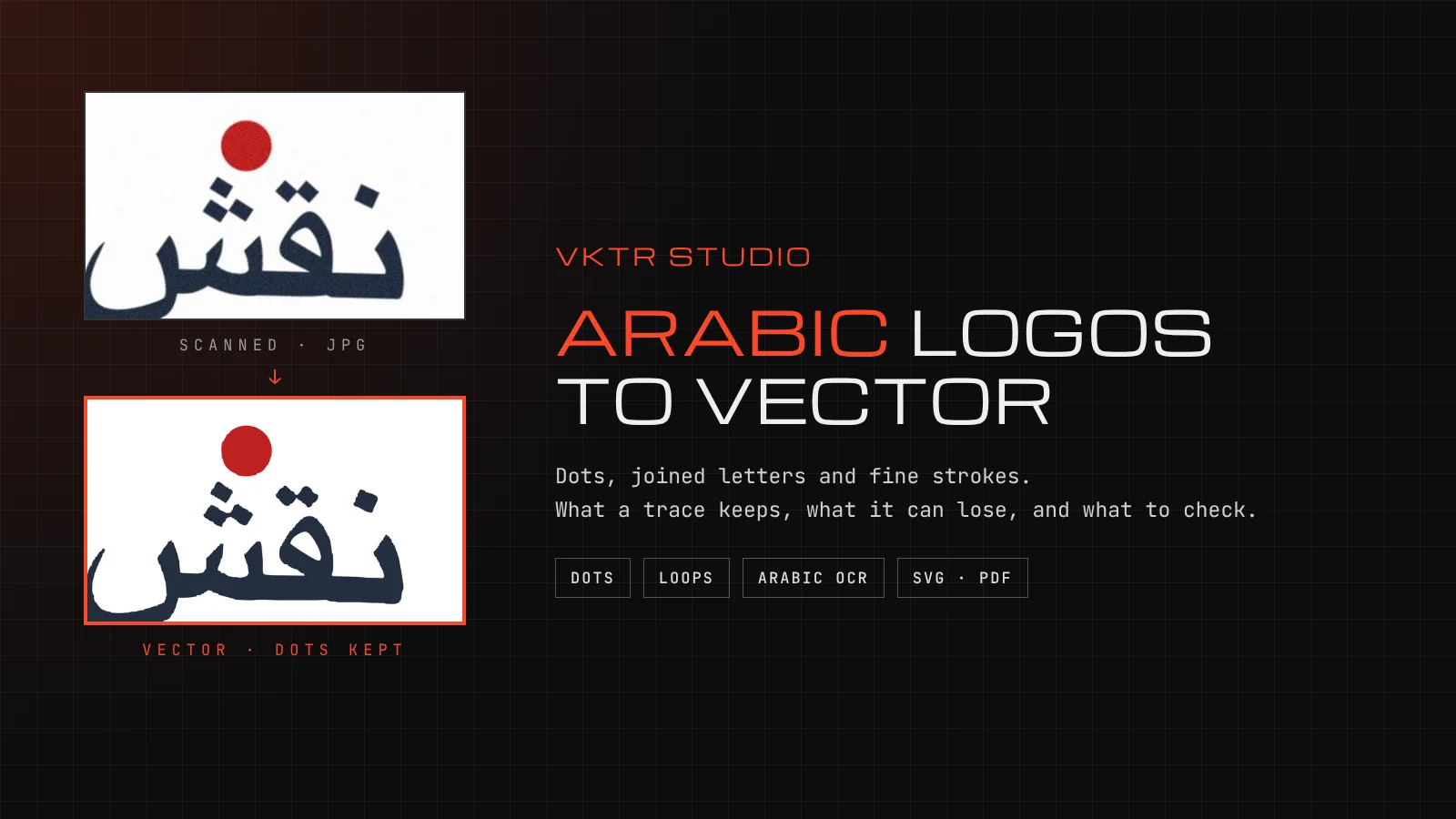
We used an invented logo from VKTR's test set: the word نقش in large letters, a smaller line reading استوديو الطباعة, a red dot and a red line. It is not a real brand. We traced a clean 1000 by 620 pixel PNG of it, and a scan-like copy of the same logo: rotated slightly, blurred, with grain added and saved as a JPEG at 914 by 581 pixels. Both were traced with VKTR Studio's own tracing code on 17 November 2026.
| File and setting | Shapes | Colours | The dots |
|---|---|---|---|
| Clean PNG, automatic | 21 | 2 | All kept |
| Scan-like JPEG, automatic | 40 | 5 | All kept; two pairs ran together |
| Scan-like JPEG, Remove small regions under 400 px² | 21 | 4 | The dots of three letters deleted |

The clean PNG traced to 21 shapes in its 2 colours, with every dot in place and the loops of the letters open. The scan-like copy was harder. Its automatic trace kept every dot, but in the small line the two dots of ي and the two dots of ة each came out as one shape. It also split the navy into three shades and traced 21 small off-white shapes: bits of the grey page inside loops and between letters.
The obvious fix for those off-white bits is speck removal. Raising Remove small regions under to 400 square pixels cut them from 21 to 5, but it also deleted the dots of ت, ي and ة in the small line. استوديو lost the dots that make it a word. This is one invented logo, so read it as an example, not a benchmark. The lesson holds for any Arabic artwork: the cleaner the source, the less clean-up the trace needs.
One more thing showed at 400% zoom. Some curves in both traces had small steps where a curve met a straight edge. They are tiny on a business card, but they grow with the print, so check them before a large sign.
How to vectorize Arabic calligraphy or a logo in VKTR Studio
1. Get the sharpest, largest copy
Ask for the file the logo was designed in, or the first copy that was sent. A screenshot or a forwarded image has fewer pixels for each dot. For calligraphy on paper, scan it, or photograph it flat in even light with the phone held straight above it, as in our sketch to vector guide.
2. Open it in VKTR Studio
Drop the image into VKTR Studio. It takes JPG, PNG, WebP and HEIC, up to 5 MB on a free account, and the tracing runs in your browser. VKTR analyses the image and picks its settings.
3. Choose the mode
A logo with more than one colour stays in Colour. For calligraphy in one ink, open Advanced settings and set the mode to Black & white. If the thin ends of strokes break up, untick Auto next to Threshold and raise it a little; if the paper grain turns into ink, lower it.
4. Go easy on speck removal
Dots and small marks are small regions too. Remove small regions under (in Black & white it is called Remove specks under) cannot tell a dot from dust. Raise it only if there is real dust, in small steps, and look at every dot after each change.
5. Check dots, loops and joins at 400%
Zoom in and compare the result with the original, letter by letter. Count the dots on each letter, check that pairs of dots have not run together, and check that the small loops in letters such as ط, ص and ة are still open. Then check the hairline ends of the strokes and the points where letters join.
6. Download
Download SVG, PDF, EPS or DXF at the width you need, from 1 to 5,000 mm. Each download uses one credit; a free account gets 2 a day.
Can the Arabic text be made editable?
Sometimes. Traced lettering is made of shapes, not text. VKTR Studio's Editable text · SVG tool can recognise Arabic words, compare five system fonts (Arial, Georgia, Times New Roman, Courier New and Verdana) with the traced letters, and swap the outlines for live text when a font overlaps them by at least 75%. It does not identify the original font, and editable text exports as SVG only. Our guide on vectorizing text covers the tool step by step.
We ran the same Arabic text recognition on our test images. On the clean PNG it read both words of the small line, استوديو at 88% confidence and الطباعة at 92%. It did not read the large stylised word نقش at all. On the scan-like copy it read الطباعة but not استوديو. For calligraphy, plan to keep the traced shapes: a calligrapher's letterforms are the point of the artwork, and a system font will not match them.
When the trace is not enough
- The source is too small or too blurred. Dots and vowel marks that have already merged or vanished cannot be traced back. See how to fix a pixelated logo for what a small source can and cannot give you.
- Dots have run together. You can delete a merged shape, but VKTR cannot split it back into two dots. Find a better copy, or ask a designer to redraw those marks.
- The artwork is not yours. A calligraphy piece found online is still someone's work. Our article on whether Pinterest images are copyright free explains what to check before printing it.
If the source is dirty rather than small, our guide on how to clean up a logo covers specks, fringes and colours in the right order. Once the Arabic logo is traced and checked, save the full set of logo file types from it, so the damaged copy is never sent again.
Arabic calligraphy and logos to vector: questions and answers
- Why did the dots disappear from my traced Arabic logo?
- Usually because speck removal was set too high, or the image was too small or blurred for the dots to stand apart. Lower Remove small regions under (Remove specks under in Black & white), trace again, and start from a larger, sharper copy if you can.
- Can VKTR Studio read the Arabic text in my logo?
- Its Editable text · SVG tool can recognise Arabic words and replace the outlines with live text in one of five system fonts when one overlaps them by at least 75%. It does not identify the original font. In our test it read a plain line of small text but not a large stylised word.
- Which file format should I use for an Arabic logo?
- SVG for the web and for cutting machines, PDF or EPS for printers, and DXF for CNC and laser software. All four keep the traced shapes, so the dots and strokes look the same at any size.