Guides7 min read
Vector Signature: How to Turn Your Signature into an SVG
A signature as clean vector lines with a transparent background, ready for documents, stamps, engraving or a logo. What to sign with, how to trace it, and how to keep the file safe.
Key takeaways
- Sign on plain white paper with a dark pen, then scan it or photograph it in even light. The cleaner the photo, the less there is to fix.
- Trace a signature in black and white. The threshold decides what counts as ink: raise it if thin parts go missing, lower it if paper grain is traced.
- In VKTR Studio the paper is left out of the file, so the SVG or PDF has a transparent background. Recolour the ink in the Palette if it should be black.
- A vector signature is an exact copy anyone could reuse. Keep the file private and send it only where you trust the use.
To turn your signature into a vector, sign on plain white paper with a dark pen, scan or photograph it in even light, trace it in black and white, and download it as SVG or PDF. The paper is dropped, so the signature has a transparent background and stays sharp at any size.
People want a vector signature for many jobs: a clean signature to place in letters and forms, artwork for a rubber stamp, a name engraved on a gift, or a signature that becomes part of a logo. A photo of a signature is fine on a screen, but it has a background, a fixed size and soft edges. A vector file has none of those problems.
Why a signature traces well
A signature is one colour of ink on a light page. That is the easiest kind of image to trace. In black and white mode the tracer sorts every pixel into ink or paper by its brightness, then draws smooth curves around the ink. The brightness that divides the two is the threshold.
In VKTR Studio the threshold runs from 0 to 255, and on Auto it is picked from the image itself with Otsu’s method, a standard way to split a picture into two groups of brightness. What can go wrong is also simple: thin, pale strokes that are close to the paper’s brightness, and anything on the paper that is as dark as the ink, such as a shadow, a printed line or a smudge.
Our test: one signature, three versions
We wrote an invented signature for the test, so it belongs to nobody. Then we made three images of it: a clean scan in black pen, and two images that imitate a phone photo of blue ballpoint, one on plain white paper and one on lined paper with light blue rules. The photos are simulations made in code, not real photographs, so read the results as an illustration, not a benchmark.
We traced each image with VKTR Studio’s own tracing code on 14 November 2026, on Auto and with other settings.
| Image | Setting | Result |
|---|---|---|
| Clean scan, black pen | Auto | Traced in black and white; 2 shapes, ink near black, no background |
| Photo, blue pen, plain paper | Auto | Traced in black and white; 2 shapes in a lighter, greyer blue, no background |
| Photo, blue pen, lined paper | Auto | Traced in black and white; the rules were dropped, with small notches where they crossed the ink |
| Photo, blue pen, plain paper | Clean artwork, Thin line art | 3,855 paths: the paper grain was read as lines |
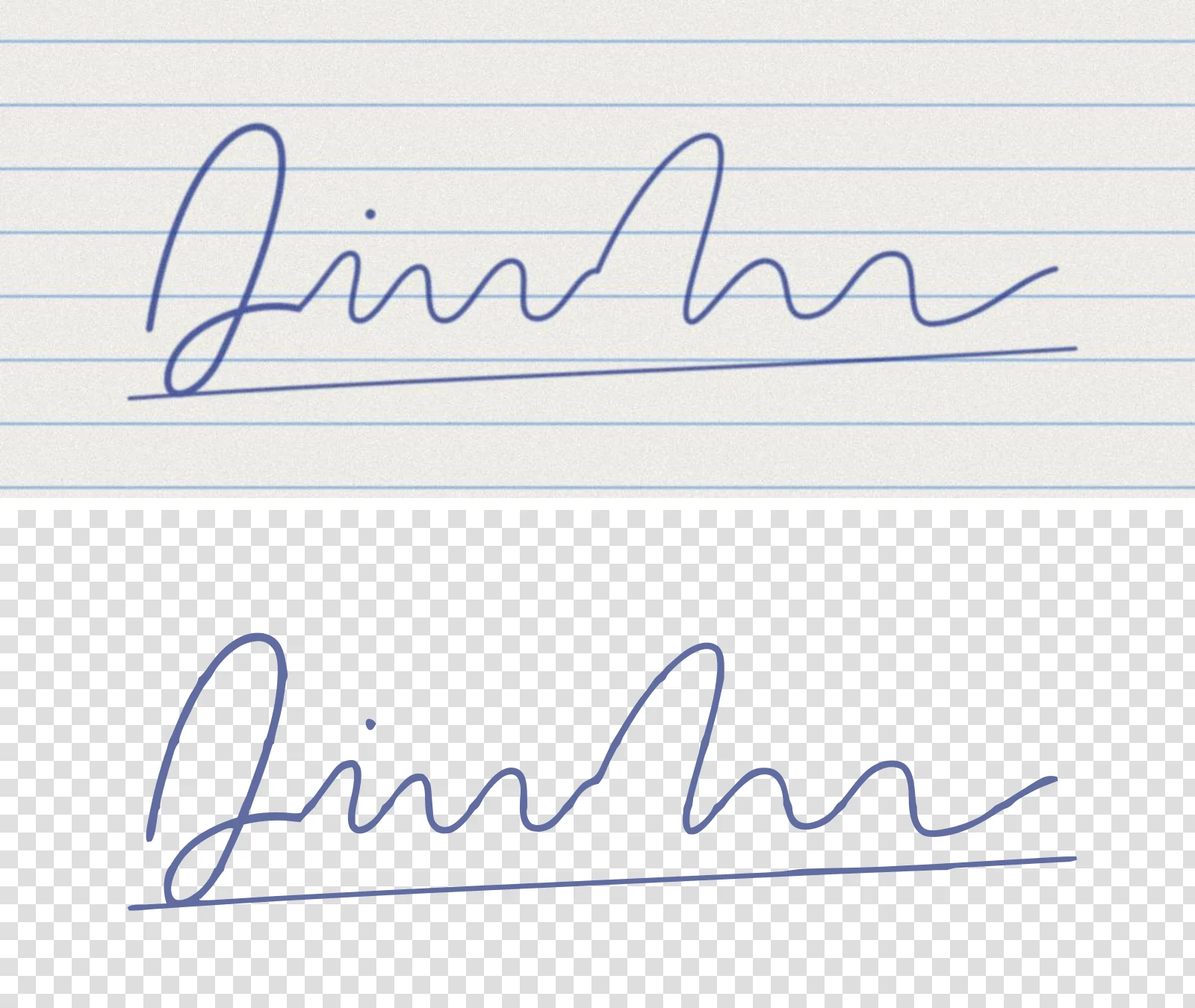
Three things stand out. The paper was left out every time, so each file had a transparent background. The blue ink came out lighter and greyer than the pen, because the soft edges of the line are averaged into its colour. And on a grainy photo, Auto (which chose Faithful trace) gave clean shapes, while Clean artwork read the paper texture as thousands of tiny lines. The lined paper worked here because the rules were light, but plain paper avoids the notches altogether. Light matters as much as paper: sketch to vector shows what a shadow across the page does to a trace.
How to make a vector signature, step by step
1. Sign on plain white paper with a dark pen
Use a black felt-tip, gel pen or fine marker if you have one. A bolder line traces more cleanly than a thin, pale ballpoint. Sign a few times and pick the one you like best.
2. Scan it, or photograph it in even light
A scanner gives the cleanest result. With a phone, hold it straight above the page in soft daylight, keep shadows off the paper, and fill the frame with the signature. Crop away the rest of the page.
3. Open it in VKTR Studio
Drop the image into VKTR Studio. It takes JPG, PNG, WebP and HEIC, so a phone photo works as it is, up to 5 MB on a free account. VKTR analyses the image and picks its settings. If it does not trace in black and white, choose Black & white under Advanced settings, then Mode.
4. Check the threshold and clean up
Zoom in on the thinnest parts: the tails, the loops and any dot. If parts of the line are missing, untick Auto and raise the threshold a little. If paper grain or a smudge is traced, lower it, or raise Remove specks under to drop small dots.
5. Choose the colour and download
The ink keeps the colour it has in the photo. To make it black, or any other colour, click its chip in the Palette and choose Recolour. Then set the width in millimetres and download SVG, PDF, EPS or DXF. The paper is left out, so the background is transparent.
Which file to use for what
| Use | File | Why |
|---|---|---|
| Letters, forms and documents | PDF, or a large PNG | PDF stays sharp in print; a PNG can be placed almost anywhere |
| Website or app | SVG | Sharp at any size and small to load |
| Rubber stamp, printing, signs | PDF, SVG or EPS | Vector files a maker can scale; ask which one they want |
| Laser engraving and cutting | SVG or DXF | Laser software reads the outlines as paths |
| Email signature | PNG | Many email apps do not display SVG |
If you need a PNG, export it from the vector at the size you need rather than using the original photo, so the edges stay clean. Our guide to logo file types explains the same set of files for a logo. For engraving a signature on wood, metal or glass, see laser engraving files, and for vinyl or paper cutting, SVG for Cricut.
Using a signature in a logo
Some brands use the founder’s signature as a logo or a mark on packaging. Trace it the same way, then decide whether it should stay exactly as written or be redrawn by a designer. If you want the name set in a font next to it, our guide to vectorizing text explains when to trace lettering and when to retype it.
Keep your signature file safe
A vector signature is a perfect copy that can be placed on anything. Treat it like a key.
- Do not post it publicly, on social media or a website, unless it is a deliberate brand mark.
- Use a made-up name or a practice signature if you only want to test how tracing works.
- Be careful where you upload it. In VKTR Studio, tracing runs in your browser, and the image is not stored or sent anywhere unless you choose the premium engine.
- Ask before you use it on a document. Whether a pasted image of a signature is accepted depends on who asked for it and where. This guide does not cover that, and it is not legal advice.
The same care applies to other people’s signatures: only trace a signature that is yours, or one you have clear permission to use.
Vector signature: questions and answers
- What is a vector signature?
- It is a signature saved as shapes and curves instead of pixels, usually as an SVG, PDF or EPS file. It stays sharp at any size and has no background.
- How do I get my signature with a transparent background?
- Sign on plain white paper, scan or photograph it, and trace it in black and white. In VKTR Studio the white paper is left out of the file, so the SVG or PDF has a transparent background.
- Should I sign in black or blue ink?
- Either works if the line is dark and even. Black traces with the most contrast. Blue keeps its colour in the trace, and you can recolour it to black or any other colour in the Palette.
- Why are parts of my traced signature missing?
- The thin or pale parts of the line are close to the paper’s brightness. Untick Auto and raise the threshold a little, or sign again with a bolder pen.
- Can I use a vector signature for a rubber stamp?
- Yes, a stamp is one-colour artwork, which suits a traced signature. Ask the stamp maker which file and size they want, then download that format: PDF, SVG and EPS all come from the same trace.